Additional brand
$25 / month
1 brand, 1 seat, 50 minutes of new video, 125 AI-generated post captions and 75 AI image edits a month.

The shared calendar where agencies and their clients plan, review and approve every post, so changes stop arriving the night before.
7-day Agency trial · Cancel anytime
Built by 8digit Creative and used every week with its own clients.
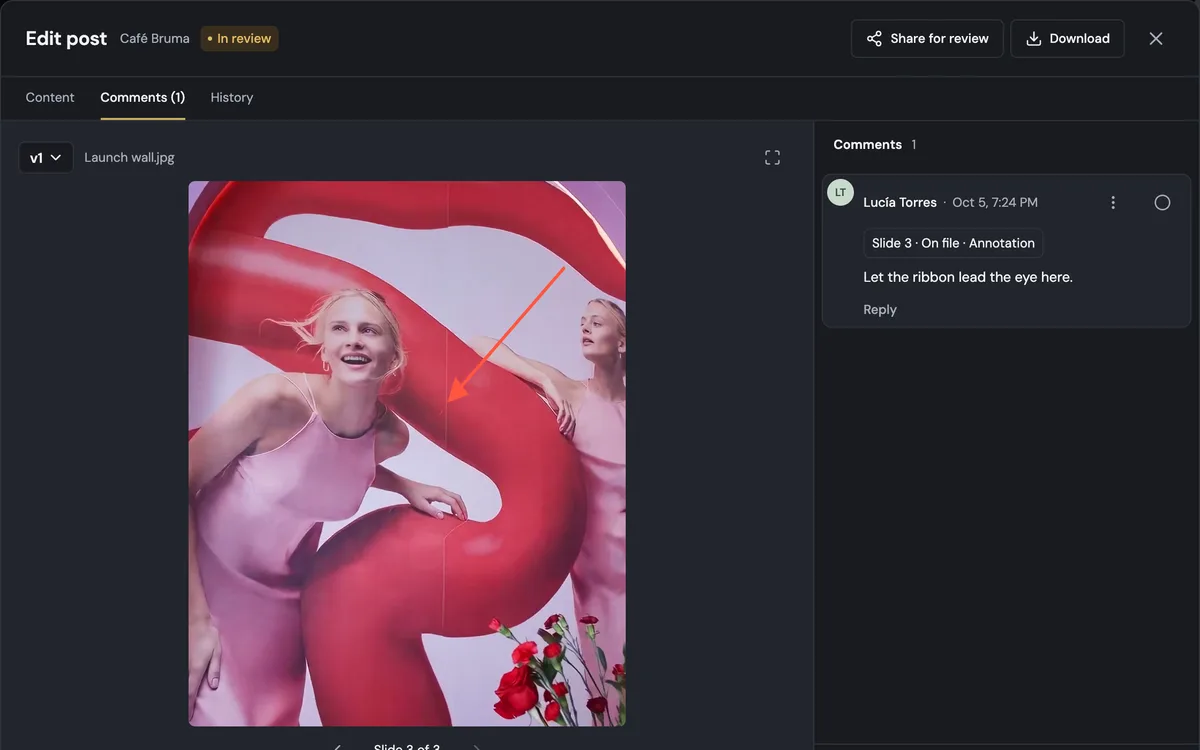
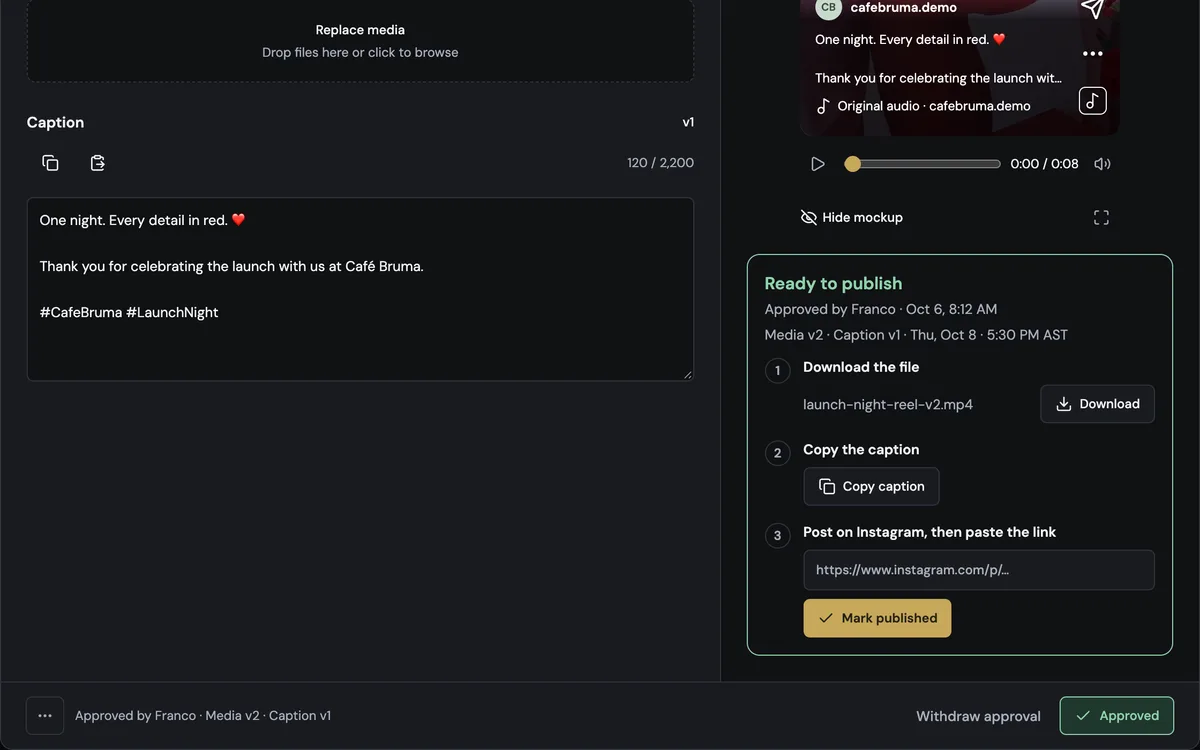
A Reel in review keeps its file, caption and comments together. Posts land on the calendar, a file goes from Library into a new post, feedback is pinned to an exact moment with an annotation, the version is approved and its Publish kit downloads the file and copies the caption.
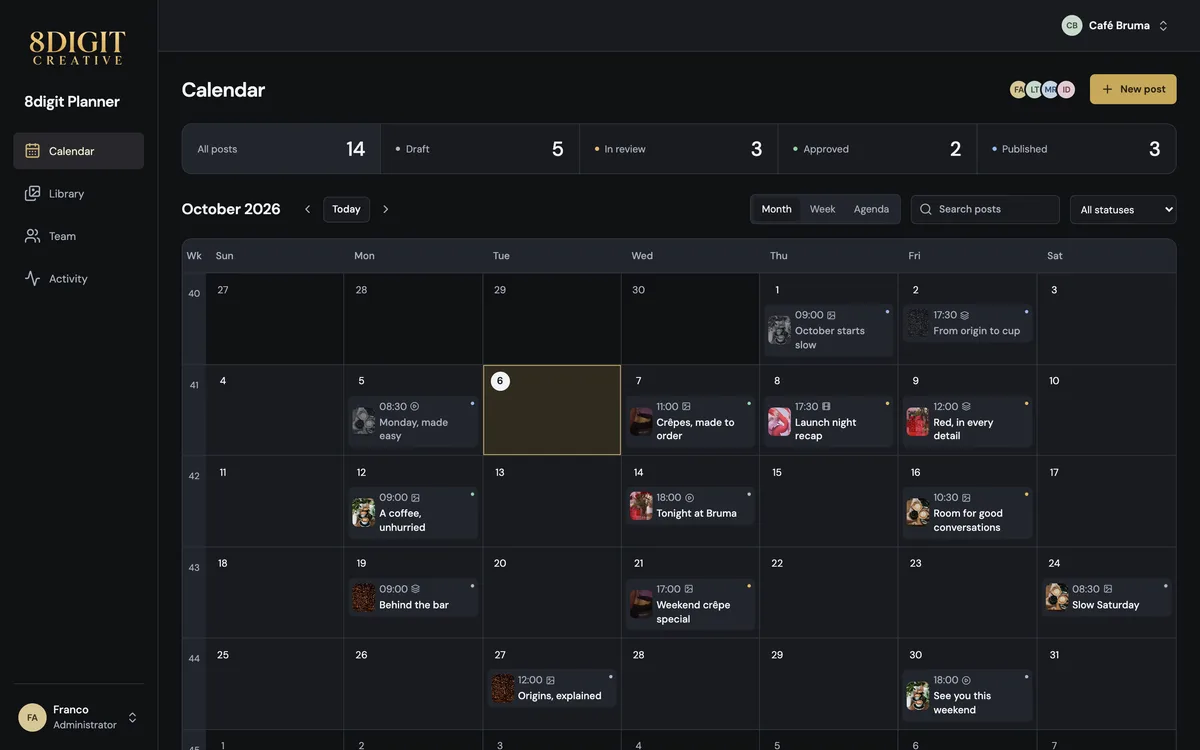
Organize posts, carousels, Stories and Reels by brand. Keep your calendar, files and versions together.
Your team creates. Brand reviewers comment on the right version, timestamp and detail, with the access you assign.
Make the decision explicit. Then Planner publishes your approved content at its scheduled time, or you download it and publish it yourself.
7-day Agency trial
Every plan starts with everything.
See all of Agency free for seven days, no card needed. Then continue on the plan you pick, or on Free. Cancel anytime.
Monthly or yearly billing in USD.
$0 / month
Best for one creator starting with a brand.
*Up to 5 GB of storage.
$29 / month
Best for a creator managing their own brands.
Everything in Free, plus…
$59 / month
Best for a small studio reviewing content with a few clients.
Everything in Personal, plus…
$119 / month
Best for agencies that review content with several clients.
Everything in Pro, plus…
$249 / month
Best for larger agencies running many client brands.
Everything in Business, plus…
Member limits include you. Guest reviewers, from Pro, receive assigned access and do not use an internal member seat.
| Plan | Free$0 / month | Personal$29 / month | Pro$59 / month | Business$119 / month | Agency$249 / month |
|---|---|---|---|---|---|
| Capacity | |||||
| Brands | 1 | 2 | 3 | 6 | 12 |
| Team members, including you | 1 | 2 | 4 | 8 | 20 |
| Video uploads per month (total length) | 15 min | 30 min | 120 min | 300 min | 750 min |
| AI-generated post captions per month | 20 | 60 | 200 | 500 | 1,250 |
| AI image edits per month | 0 | 40 | 120 | 300 | 750 |
| Extra brands and seats | Not included | Not included | Not included | Included | Included |
| Plan and review | |||||
| Content calendar for posts, carousels, Stories and Reels | Included | Included | Included | Included | Included |
| Library with folders and file versions | Up to 5 GB | Included | Included | Included | Included |
| Comments, annotations and timestamped video feedback | Included | Included | Included | Included | Included |
| Guest reviewers with assigned access | Not included | Not included | Included | Included | Included |
| Client approvals with version history | Not included | Not included | Included | Included | Included |
| Approve files and share folders with clients | Not included | Not included | Not included | Included | Included |
| Publish and connect | |||||
| Publish kit | Included | Included | Included | Included | Included |
| Automatic publishing | 20 posts a month | Included | Included | Included | Included |
| Social networks for automatic publishing | Up to 3 | All available | All available | All available | All available |
| AI assistants | Included | Included | Included | Included | Included |
| DaVinci Resolve panel | Not included | Included | Included | Included | Included |
| Large video modules from the DaVinci Resolve panel | Not included | Not included | Not included | Not included | Included |
$25 / month
1 brand, 1 seat, 50 minutes of new video, 125 AI-generated post captions and 75 AI image edits a month.
$10 / month
Bring another teammate into your workspace.
Add extras from your workspace’s Billing page.
Yes, from Plan & billing in your workspace. A bigger plan starts once the prorated difference is paid; a smaller one starts with your next billing period. Canceling stops the renewal: your plan stays active until the end of the period you paid for, and then your workspace continues on Free.
If you chose a plan during the trial, it starts with your first charge when the trial ends. If you didn’t, your workspace continues on Free with 1 brand and 1 member, and your content stays. Choose a plan in Plan & billing whenever you need more.
You pay once a year, at the price of 10 months. Video minutes and AI allowances still renew every month, and extra brands and seats follow the same yearly price.
On Business and Agency, add brands and seats anytime from Plan & billing. You see the prorated price for the rest of your billing period before you pay.
No. On Pro, Business and Agency, Guest reviewers review the content you share with them and don’t use a team seat.
Need a hand? Contact support.
Yes. Connect a brand’s social accounts and Planner publishes each approved post at its scheduled time. Free includes 20 automatic posts a month. You can always publish manually from the Publish kit.
Yes. Assign access by workspace and brand, and invite reviewers to the content they need.
No. Media requires authorized access. Sharing a Planner link does not make the file public.
Every account starts with a free 7-day Agency trial, no card needed: you see everything Agency can do, with room for 1 brand, 2 seats, 5 GB and 20 minutes of video. Nothing is charged unless you choose a plan; otherwise your workspace continues on Free.
Need a hand? Contact support.
7-day Agency trial · Cancel anytime